
C-4-0 FTA Capital Construction: Wage Conformance Request (Certified Payrolls)
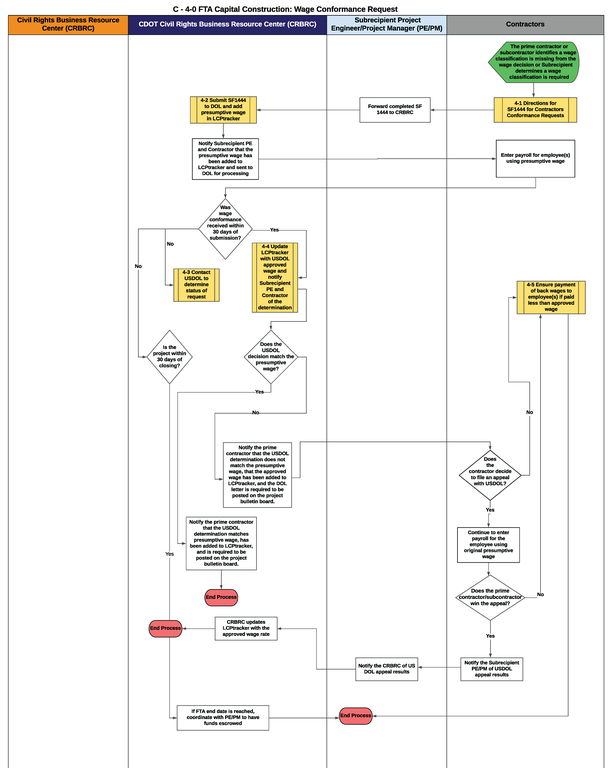
The C-4-0 FTA Capital Construction: Wage Conformance Request flowchart and process guides listed below outlines the responsibilities of the Prime Contractor, Subcontractor, and the Civil Rights Business Resource Center within the certified payroll discipline area.
Download C-4-0 FTA Capital Construction: Wage Conformance Request Flowchart
Flowchart C-4-0 - FTA Capital Construction: Wage Conformance Request
- Start: The prime contractor or subcontractor identifies that a wage classification is missing from the wage decision or the Subrecipient determines a wage classification is required.
- The prime contractor and subcontractor, if applicable, completes the Request for Authorization of Additional Classification and Rate form (SF 1444) (Figure 4-1).
- The Subrecipient Project Engineer/Project Manager (PE/PM) forwards the completed SF 1444 to the Civil Rights Business Resource Center (CRBRC).
- The Civil Rights Business Resource Center reviews and submits the SF 1444 to the United States (US) Department of Labor (DOL) and adds the presumptive wage to LCPtracker (Figure 4-2).
- The Civil Rights Business Resource Center notifies the Subrecipient Project Engineer/Project Manager and Prime Contractor that the presumptive wage has been added to LCPtracker and sent to USDOL for processing.
- The prime contractor and applicable subcontractors that have employees working in the classification of the wage conformance continue to enter payroll using the presumptive wage in LCPtracker.
- Decision Item: Was the wage conformance received by USDOL within 30 days of submission?
- If yes, continue to step 8.
- If no, continue to step 9.
- The Civil Rights Business Resource Center updates LCPtracker with the USDOL approved wage and notifies the Subrecipient PE/PM and Prime Contractor of the determination (Figure 4-4).
- The Civil Rights Business Resource Center contacts USDOL to determine the status of request (Figure 4-3). If the project is within 30 days of closing and the Civil Rights Business Resource Center shall coordinate with the Subrecipient PE/PM to have funds escrowed.
- Decision Item: Does the USDOL decision match the presumptive wage?
- If yes, continue to step 11
- If no, continue to step 12
- The Civil Rights Business Resource Center notifies the Prime Contractor that the USDOL determination matches the presumptive wage, the approved wage has been added to LCPtracker, and the DOL letter shall be posted to the project bulletin board. End Process.
- The Civil Rights Business Resource Center notifies the prime contractor that the USDOL determination does not match the presumptive wage, the approved wage has been added to LCPtracker, and the USDOL letter shall be posted to the project bulletin board.
- Decision Item: Does the contractor decide to file an appeal with the USDOL?
- If yes, continue to step 15
- If no, continue to step 14
- The prime contractor and all applicable subcontractors ensure that payment of back wages is made to employees if paid less than the rate that was approved by US DOL (Figure 4-5). End Process.
- The prime contractor and all applicable subcontractors continue to enter payroll using the originally submitted presumptive wage.
- Decision Item: Does the prime contractor or subcontractor win the USDOL appeal?
- If yes, continue to step 17
- If no, go to step 14
- The prime contractor notifies the Subrecipient Project Engineer/Project Manager of the USDOL appeal results. The PE/PM notifies the Civil Rights Business Resource Center of the appeal results and the Civil Rights Business Resource Center updates LCPtracker with the approved wage rate. End Process.
Process Guides
 Contractors
- 4-1 Directions for SF1444 for Contractors: Conformance Request
- 4-5 Ensure Payment of Back Wages to Employee(s) if Paid Less than Approved Wage (Prime Contractor)
 CDOT Civil Rights Business Resource Center
- 4-2 Submit SF1444 to DOL and add Presumptive Wage in LCPtracker
- 4-3 Contact USDOL to Determine Status of Request
- 4-4 Update LCPtracker with USDOL Approved Wage and Notify Subrecipient PE and Contractor of the Determination
