
Variable speed limit signs go live along the I-70 Mountain Corridor in Dowd Canyon
Travel Advisory
Eagle County — The Colorado Department of Transportation has begun use of 18 new Variable Speed Limit (VSL) signs along Interstate 70 west of Vail, in Dowd Canyon, between Mile Points 169 and 173. The VSL signs were brought online in mid-January, replacing the area's older static speed limit signs. This follows a thorough testing period that was used to confirm the system's reliability and to confirm its operation within the canyon.
The newly installed signs are LED electronic versions of traditional speed limit signs. This new technology automatically adjusts the speed limit displayed on the sign based on congestion, traffic conditions and adverse weather such as a snow storm and icy roads. The weather stations also measure visibility, so low visibility will also result in a lower posted speed.
“This milestone represents CDOT’s investment into technologies to enhance driver safety and improve traffic flow along one of Colorado’s most heavily traveled mountain corridors,” said CDOT Executive Director Shoshana Lew. “Statewide, weather- and congestion-based VSL algorithms are among the cutting-edge tools CDOT uses to enhance motorist safety.”
The Federal Highway Administration reports VSLs can reduce total crashes by 34%, injury/fatal crashes by 51%, and rear-end crashes by 65%. In Colorado, along the I-70 Mountain Corridor, preliminary data indicates a 20% drop in crashes in the eastbound Mountain Express Lanes since VSL implementation, particularly during busy periods.
CDOT recognizes that Dowd Canyon is one of our heavier traveled mountain roadways without the resiliency of a frontage road. The investment of VSLs in this location was chosen as one more way to reduce crashes on this critical section of I-70.
VSL signs, some adorned with flashing beacons to draw driver attention, are deployed at other locations across the state, including the I-70 Mountain Express Lanes and in Glenwood Canyon.
Motorists can expect flashing beacons when the speed limit is lowered due to adverse road conditions due to traffic or weather. These visual alerts capture drivers' attention, reinforcing the need for caution and ensuring safer navigation through this critical stretch of roadway.
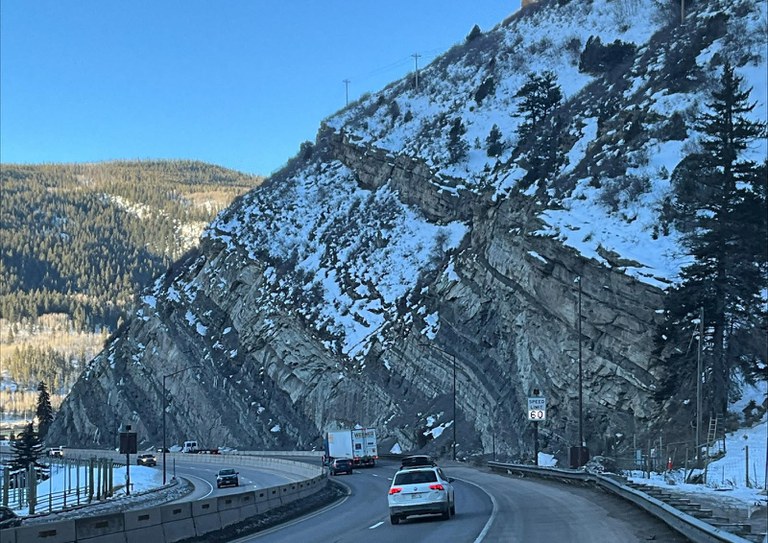
Posting the appropriate speed limit in real-time helps prevent crashes and improves traffic flow through the corridor. The beacons flash only when the speed limit is lowered due to adverse road conditions. The beacons remain dark and do not flash when the speed limit is normal.
The speed limit posted on the VSL signs is the enforceable speed limit, not a suggested speed. Drivers exceeding the posted limit may be ticketed for speeding. Variable speed limit signs around the state are continuously monitored by the 24/7 operators in the three operations centers located in Hanging Lake and Eisenhower-Johnson Memorial Tunnels and Traffic Operations Center in Golden.
Know Before You Go
Travelers are urged to “know before you go.” Gather information about weather forecasts and anticipated travel impacts and current road conditions prior to hitting the road. CDOT resources include:
- Road conditions and travel information: COtrip.org
- Download the COtrip Planner app: bit.ly/COtripapp
- Sign up for project or travel alerts: bit.ly/COnewsalerts
- Check scheduled construction lane closures: bit.ly/laneclosures
- Connect with @ColoradoDOT on social media: X, Facebook, Instagram and YouTube
Remember: Slow For The Cone Zone
The following tips are to help you stay safe while traveling through maintenance and construction work zones.
- Do not speed in work zones. Obey the posted speed limits.
- Stay Alert! Expect the unexpected.
- Watch for workers. Drive with caution.
- Don't change lanes unnecessarily.
- Avoid using mobile devices such as phones while driving in work zones.
- Turn on headlights so that workers and other drivers can see you.
- Be especially alert at night while driving in work zones.
- Expect delays, especially during peak travel times.
- Allow ample space between you and the car in front of you.
- Anticipate lane shifts and merge when directed to do so.
- Be patient!
Download the COtrip App!
The new free COtrip Planner mobile app was designed to meet the growing trend of information on mobile and tablet devices for the traveling public. The COtrip Planner app provides statewide, real-time traffic information, and works on mobile devices that operate on the iOS and Android platforms. Visit the Google Play Store (Android devices) or the Apple Store (iOS devices) to download!
