
C-7A-0 On-the-Job Training Goal Modification or Waiver (On-the-Job Training)
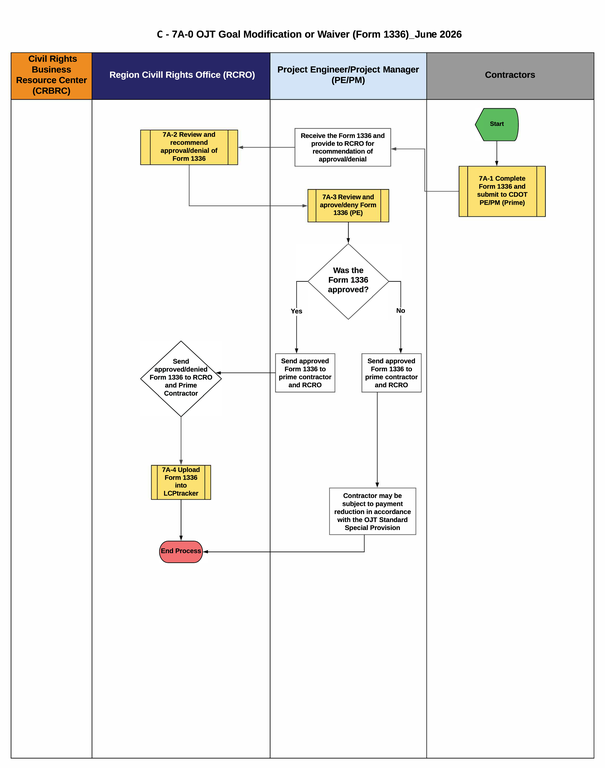
Download C-7A-0 On-the-Job Training Goal Modification Flowchart
Flowchart C-7A-0: OJT Goal Modification or Waiver (Form 1336)
1. Start: The prime contractor determines that they cannot meet the contract OJT goal and begins the process to request a modification or waiver.
2. The prime contractor completes the Waiver Request for OJT Training Hours, Form 1336 (Figure 7A-1).
3. The CDOT Project Engineer/Project Manager (PE/PM) receives the Form 1336 and provides it to the Region Civil Rights Office (RCRO) for recommendation/denial of approval.
4. The RCRO reviews the submitted Form 1336 and completes section E of the form (Figure 7A-2).
5. The CDOT Project Engineer/Project Manager reviews the submitted Form 1336 and completes Section E of the form with an approval or denial (Figure 7A-3).
6. Decision Item: Is the Form 1336 approved?
•If yes, continue to step 7.
•If no, continue to step 8.
7. The PE/PM forwards the approved Form 1336 to the prime contractor and the RCRO. The RCRO uploads the Form 1336 in LCPtracker.
8. The PE/PM forwards the denied Form 1336 to the prime contractor and the RCRO. The RCRO uploads the Form 1336 in LCPtracker. The prime contractor may be subject to payment reductions in accordance with the OJT Standard Special Provision.
9. The process ends.
Process Guides
 Contractors
 CDOT Region Civil Rights Office
- 7A-2 Review and Recommend Approval/Denial of CDOT Form 1336 (RCRO)
- 7A-4 Upload CDOT Form 1336 into LCPtracker (RCRO)
 CDOT Project Oversight