
C-5-0 FTA Capital Construction: Approve Subcontractors and Suppliers in B2GNow (B2GNow)
The C-5-0 FTA Capital Construction: Approve Subcontractors and Suppliers flowchart and process guides listed below outlines the responsibilities of the Prime Contractor, and Subrecipient Project Engineer/Project Manager for the approval of subcontractors and suppliers in B2GNow.
Download C-5-0 FTA Capital Construction: Approve Subcontractors and Suppliers in B2GNow Flowchart
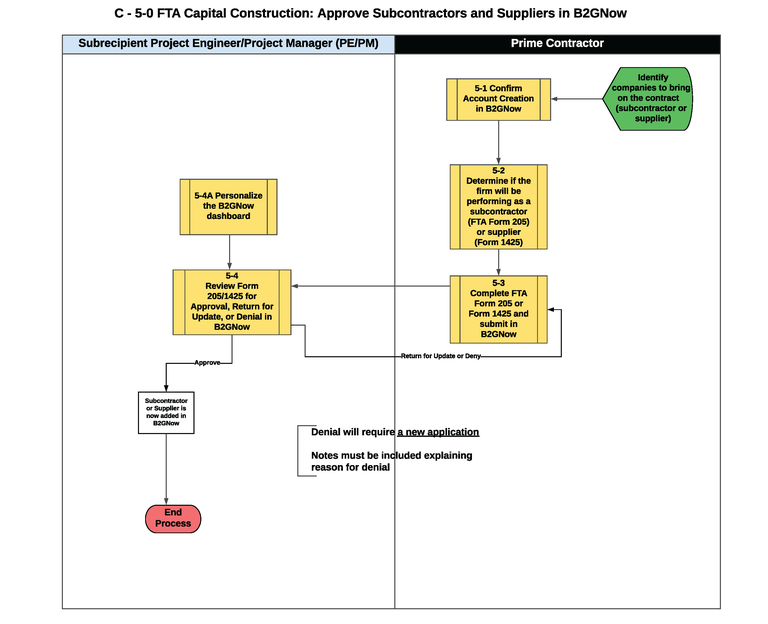
Flowchart C-5-0 - FTA Capital Construction: Approve Subcontractors and Suppliers in B2GNow
- Start: The prime contractor identifies companies to bring on the contract (subcontractors or supplier).
- The prime contractor confirms the account creation for both the prime and subcontractors in B2GNow (Figure 5-1).
- The prime contractor determines if the firm will be performing as a subcontractor using the Sublet Permit Application, CDOT FTA Form 205, or supplier using the Supplier List, CDOT Form 1425, (Figure 5-2).
- The prime contractor completes the CDOT FTA Form 205 or CDOT Form 1425 and submits the form in B2GNow (Figure 5-3).
- The Subrecipient Project Engineer/Project Manager (PE/PM) personalizes the B2GNow dashboard (Figure 5-4A).
- The Subrecipient PE/PM reviews CDOT FTA Form 205 and 1425 to approve, deny, or return for update of the subcontractor and supplier in B2GNow (Figure 5-4).
- Decision Item: Was the CDOT FTA Form 205 or 1425 approved, returned for update or denied?
- If approved, the subcontractor or supplier is now added to B2GNow. The process has ended.
- If returned for update, go back to step 4.
- If denied, the prime contractor will be required to enter a new application request in B2GNow and follow step 4.
- The process ends.
Process Guides
 Contractors
- 5-1 Confirm Account Creation in B2GNow (Prime Contractor and Subcontractor)
- 5-2 Determine if Firm will be Performing as a Subcontractor (Form 205) or Supplier (Form 1425) (Prime Contractor)
- 5-3 Complete Form 205 or Form 1425 and Submit in B2GNow (Prime Contractor)
 Subrecipient Project Engineer/Project Manager
- 5-4 Review Form 205/1425 to Recommend Approval or Denial of Subcontractors/Suppliers in B2GNow (Project Engineer/Project Manager)
- 5-4A Personalize the B2GNow Dashboard (Project Engineer/Project Manager)
