
D-2-0 FTA Planning and Design: Approve Subconsultants in B2GNow
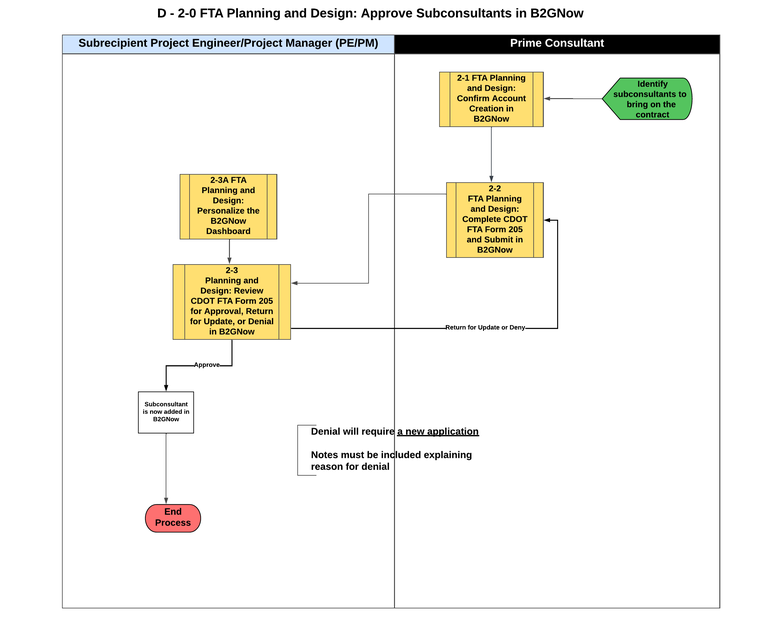
Download D-2-0 FTA Planning and Design: Approve Subconsultants in B2GNow Flowchart
Flowchart D-2-0 - FTA Planning and Design: Approve Subconsultants in B2GNow
1. Start: The Prime Consultant identifies companies to bring on the contract (subconsultants).
2. The Prime Consultant confirms the account creation for both the prime and subconsultants in B2GNow (Figure 2-1).
3. The Prime Consultant completes the CDOT FTA Form 205 and submits the form in B2GNow (Figure 2-2).
4. The Subrecipient Project Engineer/Project Manager (PE/PM) personalizes the B2GNow dashboard (Figure 2-3A)
5. The Subrecipient PE/PM reviews CDOT FTA Form 205 to approve or deny the subconsultant in B2GNow (Figure 2-3)
6. Decision Item: Was the CDOT FTA Form 205 approved, returned for update or denied?
• If approved, the subconsultant is now added to B2GNow. The process has ended.
• If returned for update, go back to step 5.
• If denied, the Prime Consultant will be required to enter a new application request in B2GNow and follow step 3.
7. The process ends.
Process Guides
 Consultants
- D-2-1 FTA Planning and Design: Confirm Account Creation in B2GNow
- D-2-2 FTA Planning and Design: Complete CDOT FTA Form 205 and Submit in B2GNow
 Subrecipient Project Engineer/Project Manager
- D-2-3 FTA Planning and Design: Review CDOT FTA Form 205 for Approval, Return for Update, or Denial in B2GNow
- D-2-3A FTA Planning and Design: Personalize the B2GNow Dashboard
Additional Resources
CDOT FTA Form 205
